An Alarm for Exam Mornings and Early Classes
An exam you cannot sit again later and a weekly early class need different things from an alarm. Here is how to set up both in AlarmK, and what to check the night before.
AlarmK is a mission alarm app for iPhone. It can require a QR scan, an NFC tag scan, finding an object, a walk, a shake, squats, exercise, a math problem, a memory sequence, number order, a sliding puzzle or typing before an alarm will stop.
Free on the App Store. No in-app purchases, no ads, no account. Requires iOS 26 or later.
Free on the App Store · Requires iOS 26 or later · On Android? Get it on Google Play (Android 10 or later)
Allow System alarm (AlarmKit) before saving. New alarms cannot be saved or turned on without this permission. With it, alarms ring through Silent mode and Focus. Check Alarm readiness at the top of the app's Settings tab.
Exam day, step by step
- Create the alarm a few days ahead and choose a specific date in the repeat section, so it rings once, on the exam day. A dated alarm can follow local time or a fixed moment, which helps if you travel across time zones.
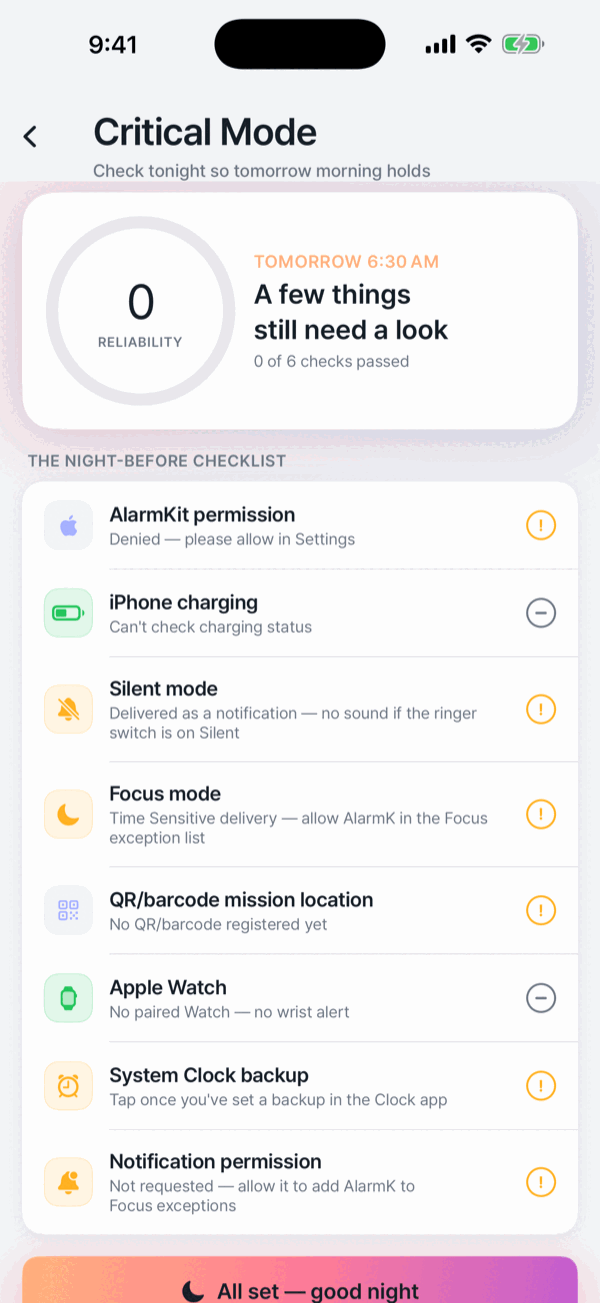
- Turn on Critical Mode for that alarm. The night before, its checklist covers the alarm and notification permissions, charging, Silent mode, Focus, your QR/barcode, Apple Watch pairing and a Clock backup you confirm yourself.
- Keep the early alert. Alarms with Critical Mode also ring 10 minutes earlier by default. You can choose 30 and 10 minutes, or turn it off, in Settings › Wake behavior › Early alerts.
- Choose a mission you have already done. The morning of an exam is not the day to try a new one, so run Try this mission the evening before.
- Set a backup alarm in Apple's Clock app as well, and tick that row in the checklist.
- Charge the iPhone overnight, and check the next ring time on the home screen before you sleep.
Critical Mode also sends a preparation reminder the night before. You can change or turn it off with Prep reminder in Settings › Night before.
Early classes, every week
- Weekday alarm. Pick only the days with an early start. An alarm has one time, so different start times need separate alarms.
- Skip one day without turning the alarm off: skip the next occurrence in the app, or with Siri and the Shortcuts app.
- Wake check rings once more 5 to 30 minutes after you finish the mission, for the mornings when you would otherwise lie back down. It is off by default.
- The Report tab shows when you actually got up against the scheduled time. It stays on your device.
- Skip public holidays works on weekday alarms but uses the Korean public-holiday calendar, so it only helps in Korea.
Which mission to choose
- To get out of bed: QR/barcode scan or NFC tag, with the code or tag by the bathroom or the kettle.
- To wake up your mind before you leave: math problem, memory, number order, sliding puzzle or typing. What each one asks.
- Sharing a room? Vibrate first vibrates without sound for 30 seconds to 3 minutes before the sound starts, on alarms with a mission or Critical Mode. Use it only if vibration alone wakes you, and not on the morning of an exam.
What it cannot do
- It cannot ring on a phone that is off or out of battery, or without the alarm permission. No alarm app can.
- It does not know your timetable. AlarmK does not read your calendar; you set each alarm yourself.
- The Critical Mode score is not a prediction. It is the share of checks that pass, not a chance of waking up.
- It cannot read the ringer switch or your Focus state. Those two checklist rows explain how the alarm will be delivered instead.
An alarm is an aid, not a certainty. AlarmK is built to reduce the situations where an alarm cannot ring, but it cannot prevent physical failures: a powered-off phone, a drained battery, a denied permission. No alarm app can. For anything that really matters, set a backup alarm in the system Clock app too.
Frequently asked questions
How do I set an alarm for one exam day only?
In the alarm's repeat section, choose a specific date. The alarm rings once, on that day. Turn on Critical Mode for the night-before checklist and an early alert 10 minutes before.
Can AlarmK make sure I do not miss an exam?
No app can promise that. AlarmK reduces the ways an alarm fails, checks what it can the night before and says plainly what it cannot check. For an exam, set a second alarm in Apple's Clock app as well.
Does it ring if I left my iPhone on Silent after class?
Yes, with the System alarm (AlarmKit) permission allowed. Alarms then ring through Silent mode and Focus, on the same path as Apple's Clock app.
Can I skip one class day without turning the alarm off?
Yes. Skip the next occurrence in the app, or ask Siri or use the Shortcuts app. The alarm rings as usual after that.
Is AlarmK free for students?
AlarmK is free for everyone, with no in-app purchases, no ads and no account to create. It requires iOS 26 or later.
Free on the App Store · Requires iOS 26 or later
Written for AlarmK 1.9.0. Last updated 22 November 2026.