Mission Alarm for People Who Fall Back Asleep
A mission alarm does not stop when you tap it. It stops when you finish a task — scanning a code across the room, solving a problem, or standing up and moving.
AlarmK is a mission alarm app for iPhone. It can require a QR scan, a math problem, a memory sequence, typing, a shake, squats, a walk or finding an object before an alarm will stop.
Free on the App Store. No in-app purchases, no ads, no account. Requires iOS 26 or later.
Free on the App Store · Requires iOS 26 or later
Allow System alarm (AlarmKit) before saving. In 1.6.0, new alarms cannot be saved or enabled without this permission. Existing alarms scheduled before denial may use ordinary notifications affected by Silent and Focus. Check Alarm readiness at the top of the app's Settings tab.
What is a mission alarm?
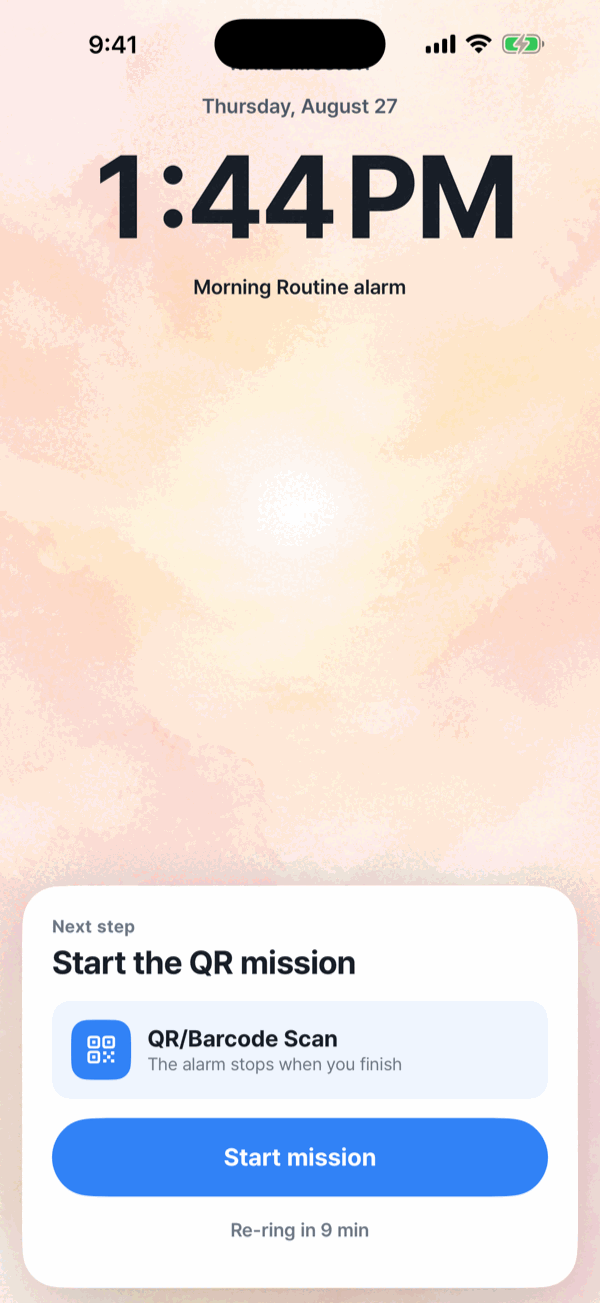
A mission alarm requires you to complete a task before the alarm can be dismissed. The goal is simple: make waking up an action, not just a tap.
In AlarmK, a mission is what you have to do before the alarm will stop. It stops you dismissing the alarm with your eyes closed and gets you physically moving. Every alarm can have its own.
Even an alarm with no mission keeps repeating until you turn it off — it is not a notification that chimes once. Repeats run for the re-ring duration set in Settings › Wake behavior, which is 15 minutes by default.
The eight missions in AlarmK
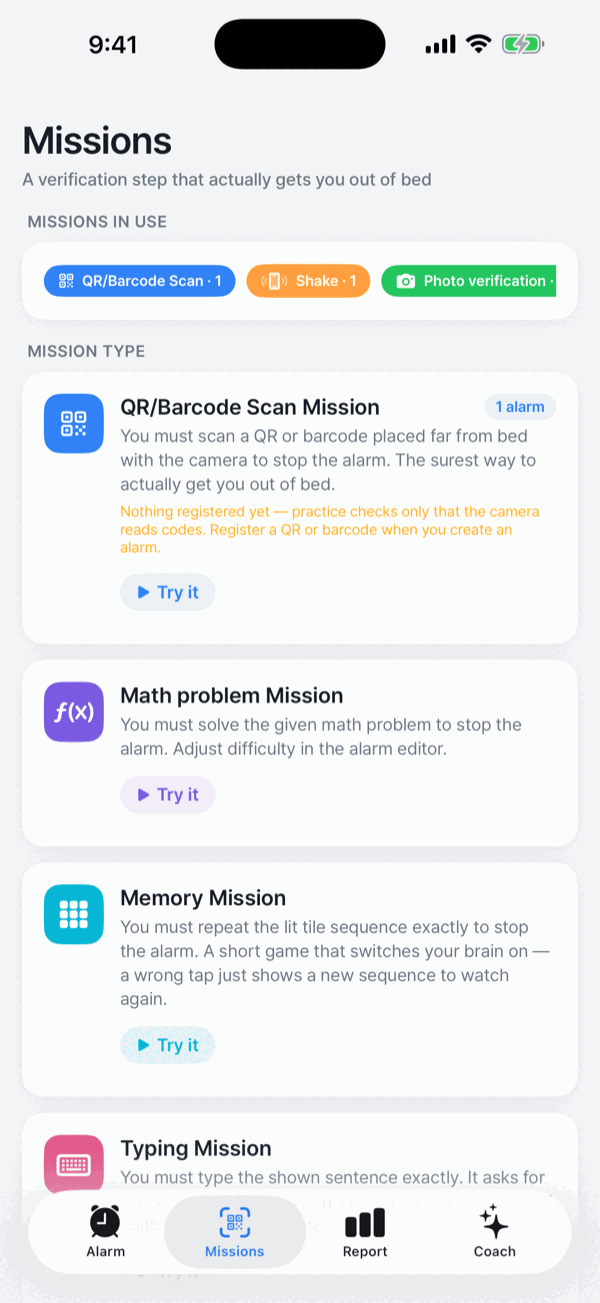
Choose Easy, Normal or Hard for each mission except the QR scan, so you can match it to how hard you are to wake. Math and memory go one step further with Expert. Each mission's page spells out what a level means in the morning, such as “3 problems · two-digit + and −”.
QR / barcode scan
Scan a code you have put somewhere far from the bed. The most reliable of the eight.
Math problem
Solve the problem you are given.
Memory
Repeat the sequence of lit tiles. Get it wrong and it simply shows a new sequence; there is no penalty. Watch again shows a new sequence if you lose track.
Typing
Type the sentence shown. Case and repeated spaces are ignored.
Shake
Shake the phone a set number of times.
Squat
Do a set number of squats. It detects the pause at the bottom, so just going through the motions does not count.
Walk
Take a set number of steps. Only steps after the mission starts are counted.
Find an object
Register the fixtures you have — the toilet, the washing machine, the fridge. The alarm picks one, two or three of them at random by difficulty. You need at least one registered object to add it. Photos are judged on the iPhone and never stored.
Mission chains — up to five per alarm
You can chain up to five missions on one alarm. You do them in the numbered order, and the alarm keeps ringing until the last one is done. In the alarm editor, Add mission adds them and Edit order changes the order.
Try this mission, before the morning that matters
Every mission has a Try this mission button, and an alarm with several has Try this sequence. Nothing rings and nothing is recorded in your wake history. It is the way to confirm a printed QR code actually scans before you rely on it.
Emergency stop, when a mission is genuinely out of reach
In 1.6.0, Emergency stop starts with a 30-second wait while the alarm continues. For a QR mission, the backup sequence is five math problems followed by 50 shakes; both stages must finish. If the primary mission is math, the sequence is 50 shakes followed by a memory task. If neither sequence is possible, the last-resort route adds a 60-second wait and 30 confirmation taps. This is recorded as an emergency stop rather than a completed mission. You can turn off Allow emergency stop in the alarm editor to hide the normal shortcut; it still appears if a mission cannot start, such as when camera access is off.
Who is a mission alarm for?
- Heavy sleepers who can dismiss an alarm without ever waking up.
- People who snooze repeatedly and want the first dismissal to actually mean something.
- Shift workers — AlarmK has a shift-pattern repeat mode anchored to the first day of a work block, alongside weekday repeats and one-off dated alarms.
- Anyone building a physical wake-up routine, where the alarm ends at the bathroom mirror or the coffee machine rather than on the pillow.
An alarm is an aid, not a certainty. AlarmK is built to reduce the situations where an alarm cannot ring, but it cannot prevent physical failures: a powered-off phone, a drained battery, a denied permission. No alarm app can. For anything that really matters, set a backup alarm in the system Clock app too.
Frequently asked questions
What is a mission alarm?
A mission alarm requires you to complete a task before the alarm can be dismissed. Instead of a single tap, it asks for something you can only do awake — scanning a code, solving a problem, or moving your body.
Can I choose different missions?
Yes. AlarmK has eight missions — QR/barcode scan, math problem, memory, typing, shake, squat, walk and finding an object — and every alarm can have its own. Every mission except the QR scan has an Easy, Normal or Hard difficulty, and math and memory add an Expert level.
Can I use more than one mission on a single alarm?
Yes. You can chain up to five missions on one alarm. You do them in the numbered order, and the alarm keeps ringing until the last one is done.
Does AlarmK support QR codes?
Yes. You can use the code AlarmK generates, or register a barcode you already own such as a milk carton, a book's ISBN or a delivery box. Scanning is verified entirely on your device. See how the QR alarm works.
What happens if I genuinely cannot finish a mission?
In 1.6.0, Emergency stop starts with a 30-second wait while the alarm continues. For a QR mission, the backup sequence is five math problems followed by 50 shakes; both stages must finish. If the primary mission is math, the sequence is 50 shakes followed by a memory task. If neither sequence is possible, the last-resort route adds a 60-second wait and 30 confirmation taps. This is recorded as an emergency stop rather than a completed mission. You can turn off Allow emergency stop in the alarm editor to hide the normal shortcut; it still appears if a mission cannot start, such as when camera access is off.
Is AlarmK free?
Yes. AlarmK is free on the App Store with no in-app purchases and no account to create. It requires iOS 26 or later.
Does AlarmK contain ads?
No. There is no advertising SDK in the app, and while an alarm is ringing there are no ads, no subscription prompts and no rating requests.
Written for AlarmK 1.6.0. Last updated 14 October 2026.