A Simple Alarmy Alternative for iPhone
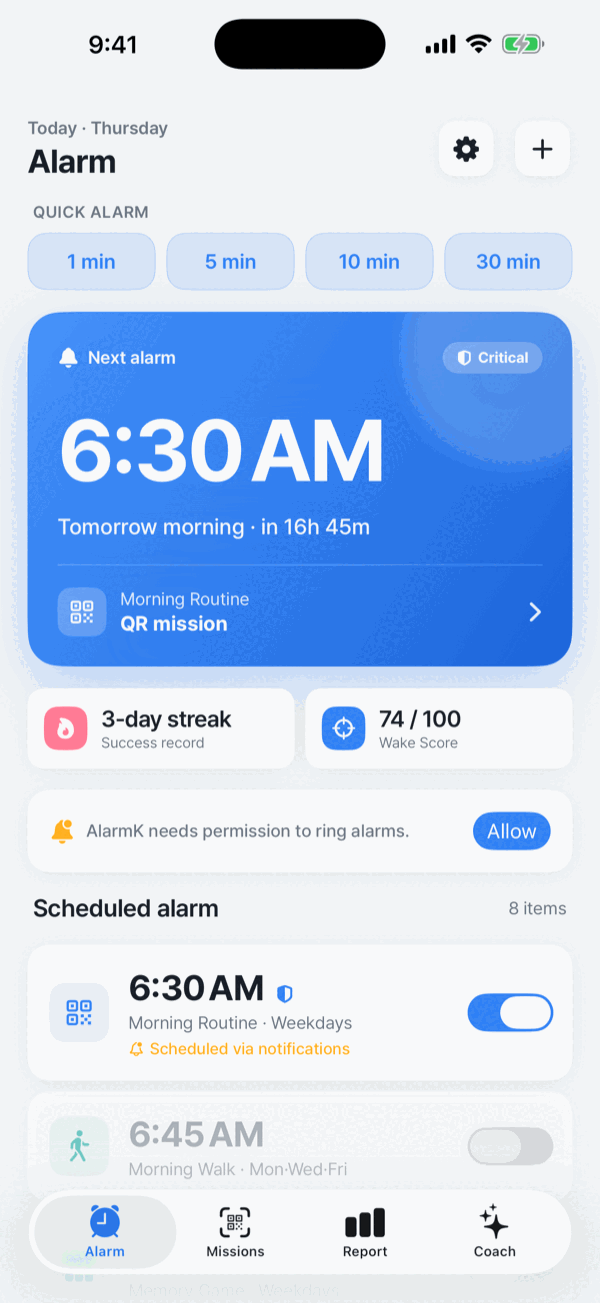
If you like the idea of mission-based alarms but want a simpler option, AlarmK focuses on the essentials: system alarms on iOS 26, wake-up missions, and a clean experience without ads or a subscription.
AlarmK is a mission alarm app for iPhone. It can require a QR scan, a math problem, a memory sequence, typing, a shake, squats, a walk or finding an object before an alarm will stop.
Free on the App Store. No in-app purchases, no ads, no account. Requires iOS 26 or later.
Free on the App Store · Requires iOS 26 or later
What you get with AlarmK
Comparing other apps here would be second-hand, and a table of claims about software we do not run is worth very little to you. So this one has two columns: what AlarmK does, and where to look to check the same thing yourself on whatever else you are weighing. Every check on the right takes under a minute.
| What to compare | AlarmK | How to check it on another app |
|---|---|---|
| Price | Free | The price on its App Store listing |
| In-app purchases | None | App Store listing › In-App Purchases. Absent means there are none |
| Subscription | Not required | Same section — a subscription is listed with its price |
| Ads while ringing | None | Set an alarm a minute out and let it ring. This one has to be tested, not read |
| Account required | No | The first screen after installing |
| System alarms (AlarmKit) | Yes, with the permission | App Store › Compatibility. AlarmKit arrived in iOS 26 |
| Missions per alarm | Up to five, in order | The app’s alarm editor |
| What leaves your device | Only Apple’s own systems | App Store listing › the App Privacy label |
| Platform | iPhone, iOS 26 or later | App Store › Compatibility |
Why people choose AlarmK
Eight missions, chained if you want them
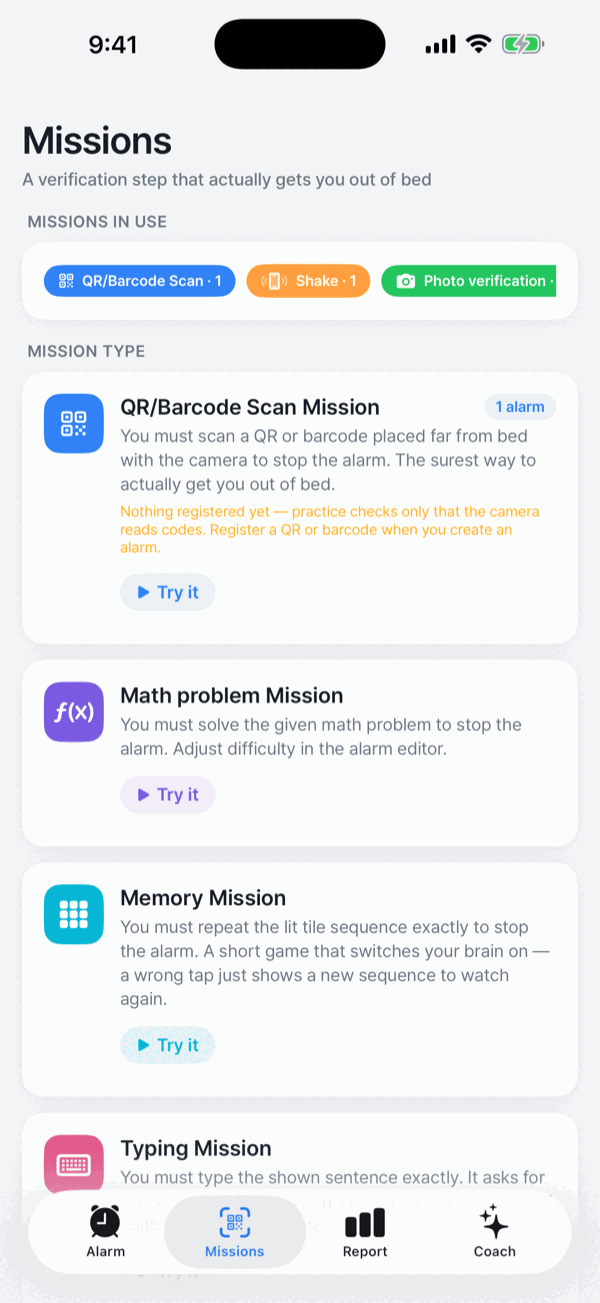
QR/barcode scan, math, memory, typing, shake, squat, walk and finding an object — all but the QR scan with an Easy, Normal or Hard difficulty, and an Expert level on math and memory. You can chain up to five on one alarm and the alarm keeps ringing until the last one is done. See all eight missions.
System alarms, not just notifications
AlarmK is built on AlarmKit, the system alarm API Apple introduced in iOS 26. With the system alarm permission allowed, alarms ring through the same path as Apple's Clock app: through Silent mode and through Focus, full screen on the Lock Screen. How AlarmKit works.
Nothing is sold to you in the morning
While an alarm is ringing there are no ads, no subscription prompts, no rating requests. AlarmK does not bundle any advertising, analytics, tracking or social SDK — every third-party framework in the app is an Apple system framework.
Your data stays on your device
AlarmK has no account to create. Alarms, missions and wake statistics are stored locally. Data leaves the device only through Apple's own systems: iCloud backup, iCloud sync to your own private container, and Apple's App Store diagnostics. Photos for the Find an object mission are judged on the device and discarded immediately — never stored or transmitted.
It tells you when it cannot help
Without the system alarm permission, new alarms cannot be saved or turned on, and an alarm scheduled before it was turned off is marked Delivered as a notification in your list, rather than quietly behaving differently. Critical Mode puts eight pre-flight checks on one screen before a morning that matters, and anything it cannot verify is never counted as a pass.
What reviewers wrote
Two App Store reviews, quoted as written. Cuts are marked with “…”.
“The main reason I can’t settle on an alarm app is because of subscriptions … Similar to Alarmy but with better UI, no ads, and entirely free? I’d gladly pay a one-time fee simply to support the creator.”
“The app do what it’s supposed to and do not bother with premium subscription, really useful.”
Every review, including feature requests and low ratings, is on the App Store. Read all reviews. If you wrote one of these reviews and would like it taken down, write to hello@alarmk.com and we will remove it right away.
Honest limits
Things worth knowing before you switch:
- iOS 26 or later is required. There is no AlarmKit on iOS 18 and earlier, so those versions are not supported.
- iPhone only for now. Once the iOS app is stable there is a plan to build an Android version that matches or improves on it, but there is no release date to announce.
- No standalone Apple Watch alarm. iPhone alarms mirror to the wrist and the Live Activity appears in the Watch Smart Stack, but AlarmKit does not support watchOS yet, so the mission has to be finished on the iPhone.
- AlarmK is currently free. There are no in-app purchases today. If a paid tier ever arrives, this site will say so first.
An alarm is an aid, not a certainty. AlarmK is built to reduce the situations where an alarm cannot ring, but it cannot prevent physical failures: a powered-off phone, a drained battery, a denied permission. No alarm app can. For anything that really matters, set a backup alarm in the system Clock app too.
Frequently asked questions
Is AlarmK free?
Yes. AlarmK is free on the App Store. There are no in-app purchases and no account to create. If a paid tier ever arrives, the site will say so first.
Does AlarmK require a subscription?
No. Every feature described on this site is available without a subscription, including the QR mission, mission chains and Critical Mode.
Does AlarmK show ads?
No. AlarmK does not bundle any advertising, analytics, tracking or social SDK. While an alarm is ringing there are no ads, no subscription prompts and no rating requests.
Does AlarmK support QR missions?
Yes. You can scan a code AlarmK generates or a barcode you already own, such as a milk carton or a book's ISBN. Verification happens entirely on-device. See how the QR alarm works.
Is AlarmK available on iPhone?
Yes. AlarmK is an iPhone app and requires iOS 26 or later, because it is built on AlarmKit, the system alarm API Apple introduced in iOS 26.
Is AlarmK available on Android?
Not today. Once the iOS app is stable there is a plan to build an Android version that matches or improves on it, but there is no release date to announce.
Do I need an account to use AlarmK?
No. AlarmK has no account to create. Alarms, missions and wake statistics are stored on your device, and data leaves it only through Apple's own systems such as iCloud backup and iCloud sync to your private container.
AlarmK is an independent app. It is not affiliated with, endorsed by, or connected to any other alarm app named on this page, and all other product names are the trademarks of their respective owners. This page describes what AlarmK does and makes no claim about any other app.
Written for AlarmK 1.6.0. Last updated 14 October 2026.