Everything AlarmK Does
A mission alarm is the headline, but most of AlarmK is the unglamorous part: getting the alarm to actually ring, on the days you actually want it.
AlarmK is a mission alarm app for iPhone. It can require a QR scan, a math problem, a memory sequence, typing, a shake, squats, a walk or finding an object before an alarm will stop.
Free on the App Store. No in-app purchases, no ads, no account. Requires iOS 26 or later.
Free on the App Store · Requires iOS 26 or later
Wake-up missions
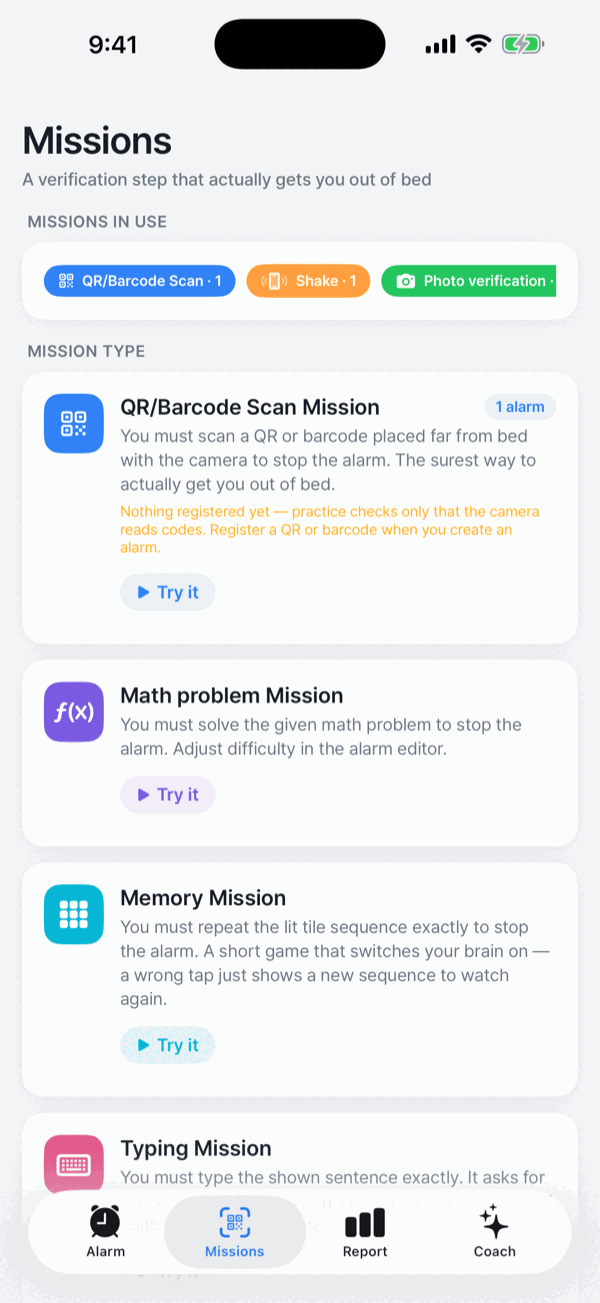
A mission is what you have to do before the alarm will stop. It stops you dismissing the alarm with your eyes closed and gets you physically moving. There are eight. Every one except the QR scan has a choice of Easy, Normal or Hard — math and memory also offer Expert — and each mission's page spells out the workload, such as “3 problems · two-digit + and −”. Every alarm can have its own.
QR / barcode scan
Scan a code you have put somewhere far from the bed. The most reliable of the eight.
Math problem
Solve the problem you are given.
Memory
Repeat the sequence of lit tiles. Get it wrong and it simply shows a new sequence; there is no penalty. Watch again shows a new sequence if you lose track.
Typing
Type the sentence shown. Case and repeated spaces are ignored.
Shake
Shake the phone a set number of times.
Squat
Do a set number of squats. It detects the pause at the bottom, so just going through the motions does not count.
Walk
Take a set number of steps. Only steps after the mission starts are counted.
Find an object
Register the fixtures you have — the toilet, the washing machine, the fridge. The alarm picks one to three of them at random. You need at least one registered object to add it. Photos are judged on the iPhone and never stored.
You can chain up to five missions on one alarm, done in the numbered order; Edit order changes it. Try this mission runs any mission as practice — nothing rings and nothing is recorded. If you cannot complete a mission, Emergency stop uses a deliberate waiting and backup-mission sequence and records an emergency stop. Its availability depends on the alarm's setting. See missions and the current emergency-stop steps.
A reliable alarm experience
AlarmK is built on AlarmKit, the system alarm API Apple introduced in iOS 26. With system alarm permission allowed, alarms ring through Silent and Focus and appear on the Lock Screen. In 1.6.0, new alarms cannot be saved or enabled without that permission. Existing alarms scheduled before permission was denied may fall back to notifications, affected by Silent and Focus; those alarms are marked Delivered as a notification.
An alarm keeps repeating until you turn it off; it is not a notification that chimes once. Repeats run for the re-ring duration in Settings › Wake behavior, 15 minutes by default. Ringing escalation raises the app's own audio after about 40 seconds of no response, and gentle wake fades the sound in over the first 30 seconds. The Dynamic Island and the Lock Screen Live Activity carry the countdown, the ringing state, then mission progress. How AlarmKit works.
Each alarm has its own sound and background. There are 32 sounds, grouped by mood in the picker. The background is one of 17 photos or the default dawn, shown behind the ringing screen and your missions; the Lock Screen alarm itself is drawn by iOS and does not change. Settings › New alarm defaults sets what new alarms start with.
Critical Mode
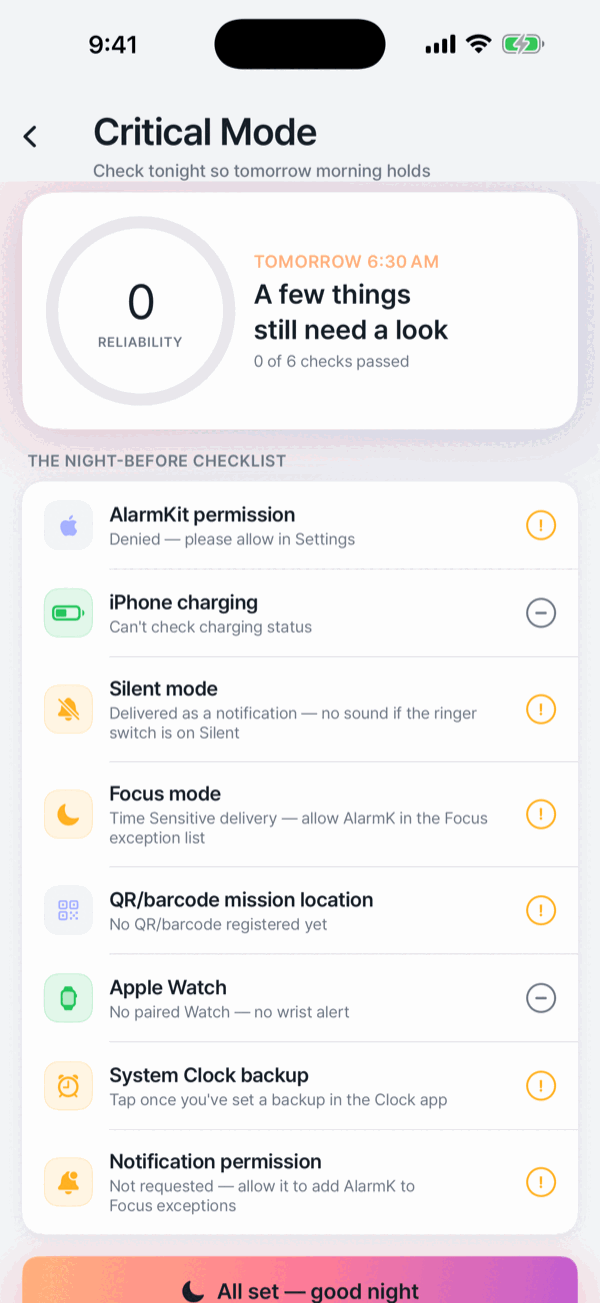
Before a first day at work, flight or interview, use the eight-row Critical Mode checklist. It checks permissions, battery and charging, QR registration, and Apple Watch pairing. Silent and Focus rows explain delivery; the app does not read their current state or check where you placed the QR. Set a Clock backup yourself and mark it as checked. The night-before preparation reminder is a notification. Advance alarms ring 30 and 10 minutes early by default; choose only 10 minutes or Off with Early alerts in Settings › Wake behavior. The checklist score is not a wake-up success rate. Important plans still need a Clock backup.
Schedules for real life
Three repeat modes, because not everyone works Monday to Friday:
- Weekday — pick the days of the week it should ring.
- A specific date — rings once, and you choose whether it follows local time or a fixed instant, which matters when you are crossing time zones.
- Shift pattern — something like two days on, two days off, anchored to the first day of the work block. Set up 2-on/2-off, 4-on/4-off or every-other-day alarms.
Skip public holidays applies to weekday alarms. The Korean statutory holiday table, including substitute holidays through 2028, ships inside the app, so no network call is made to check. It does not apply to shift or dated alarms.
Wake check rings once more 5 to 30 minutes after you finish the mission, for the mornings when finishing a mission and staying up are two different things. It is off by default.
Widgets, Shortcuts and the Watch
Home Screen and Lock Screen widgets show the next alarm and a countdown, with three Lock Screen accessory sizes. Siri and Shortcuts expose four actions you can run without opening the app: set an alarm, ask about the next one, start a nap or quick alarm, and skip the next occurrence.
iPhone alarms mirror to Apple Watch under the system's own rules and the Live Activity appears in the Watch Smart Stack. AlarmKit does not support watchOS yet, so there is no standalone Watch alarm and the mission has to be finished on the iPhone.
Wake Report and Coach, on your device
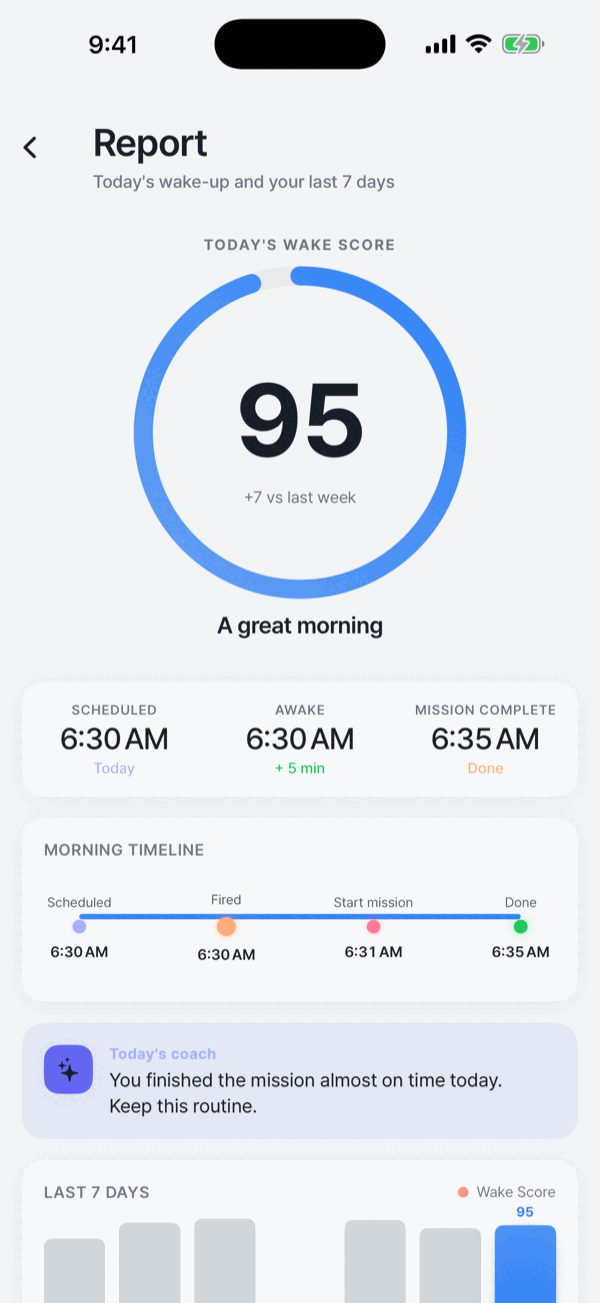
The Report tab logs when the alarm rang and when the mission started and finished, and turns that into a Wake Score with a seven-day trend, that morning's timeline, your snooze count and how late you were against the scheduled time. The Coach tab adds this week's average, success rate and streak with short insights drawn from your own records. All of it is processed on your device; none of it is sent to our servers.
Privacy and simplicity
AlarmK has no account and nothing to sign up for. Alarms, missions and wake statistics are stored locally, and data leaves the device only through Apple's own systems: iCloud backup, iCloud sync to your private container, and Apple's App Store diagnostics. Photos for the Find an object mission are judged on the device and discarded immediately — never stored or transmitted.
The app bundles no advertising, analytics, tracking or social SDK; every third-party framework in it is an Apple system framework. While an alarm is ringing there are no ads, no subscription prompts and no rating requests. Read the privacy policy.
An alarm is an aid, not a certainty. AlarmK is built to reduce the situations where an alarm cannot ring, but it cannot prevent physical failures: a powered-off phone, a drained battery, a denied permission. No alarm app can. For anything that really matters, set a backup alarm in the system Clock app too.
Written for AlarmK 1.6.0. Last updated 14 October 2026.