A Puzzle Alarm That Makes You Think Before It Stops
Five of AlarmK's twelve missions are puzzles. The alarm keeps ringing until you solve one, so you cannot stop it on reflex. Here is what each one asks at each difficulty.
AlarmK is a mission alarm app for iPhone. Its puzzle missions are a math problem, a memory sequence, number order, a sliding puzzle and typing. It has seven more missions that get you moving, such as a QR scan or an NFC tag.
Free on the App Store. No in-app purchases, no ads, no account. Requires iOS 26 or later.
Free on the App Store · Requires iOS 26 or later · On Android? Get it on Google Play (Android 10 or later)
Allow System alarm (AlarmKit) before saving. New alarms cannot be saved or turned on without this permission. With it, alarms ring through Silent mode and Focus. Check Alarm readiness at the top of the app's Settings tab.
The five puzzle missions
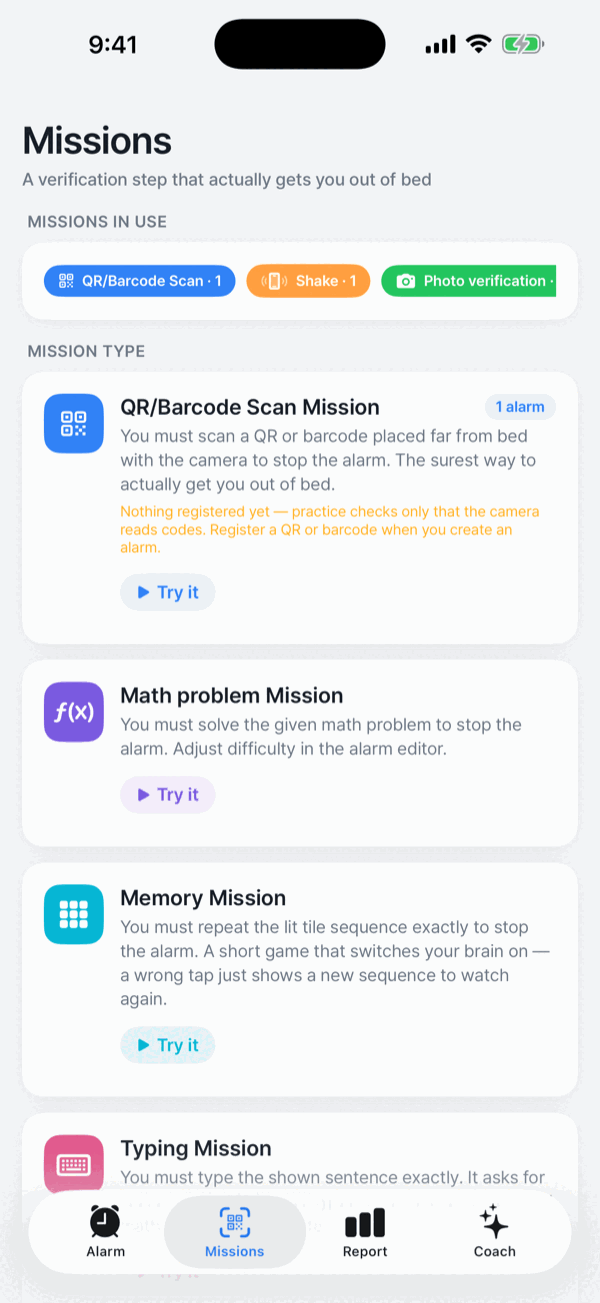
Math problem
Solve a few problems in a row. The level sets how many and what kind, from single digits to two-digit by one-digit multiplication.
Memory
Watch tiles light up, then tap them in the same order. Get it wrong and it shows a new sequence; there is no penalty. Watch again shows a new sequence if you lose track.
Number order
Find and tap the numbers in order from 1 on a shuffled board. A wrong tap costs nothing, except on Expert, where it starts over on a new board.
Sliding puzzle
Slide the numbered tiles back into order. There is no Expert level and nothing to set up.
Typing
Type the sentence shown. Case and repeated spaces are ignored.
What each difficulty asks
Each mission's page in the app spells out the workload before you choose it. These are the levels in AlarmK 1.8.2:
| Mission | Easy | Normal | Hard | Expert |
|---|---|---|---|---|
| Math problem | 2 problems, single digits | 3 problems, two-digit + and − | 4 problems, with multiplication | 5 problems, two-digit × one-digit |
| Memory | 3 tiles in order | 4 tiles in order | 5 tiles in order | 6 tiles in order |
| Number order | 3×3 board, 1 to 9 | 4×4 board, 1 to 16 | 5×5 board, 1 to 25 | 5×5 board, a mistake starts over |
| Sliding puzzle | 3×3, lightly shuffled | 3×3, well shuffled | 4×4, well shuffled | No Expert level |
| Typing | 1 short phrase | 1 sentence | 2 long sentences | No Expert level |
How to set it up
- In the alarm editor, tap Add mission and pick a puzzle. A new alarm already starts with one math mission.
- Choose Easy, Normal or Hard, or Expert for math, memory and number order.
- Tap Try this mission to do it once now. Nothing rings and nothing is recorded.
- To add another mission, tap Add mission again. Edit order changes the order. One alarm takes up to five.
- Save the alarm and check its next ring time.
None of the five needs the camera, motion access or anything registered in advance.
What a puzzle cannot do
- A puzzle can be solved lying down. If the problem is getting out of bed, put a QR/barcode scan, NFC tag or Find an object mission first in the chain, and the puzzle after it.
- An easy level can be solved half-asleep. If that happens, move up a level or chain two missions.
- If you genuinely cannot finish, Emergency stop starts with a 30-second wait while the alarm keeps ringing. If your mission is math, the backup is 50 shakes followed by a memory task; for the other puzzles it is five math problems followed by 50 shakes. It is recorded as an emergency stop, not a completed mission.
An alarm is an aid, not a certainty. AlarmK is built to reduce the situations where an alarm cannot ring, but it cannot prevent physical failures: a powered-off phone, a drained battery, a denied permission. No alarm app can. For anything that really matters, set a backup alarm in the system Clock app too.
Frequently asked questions
What is a puzzle alarm?
An alarm that only stops when you solve something: a few math problems, a sequence of tiles to repeat, numbers to tap in order, tiles to slide back into place or a sentence to type. In AlarmK these are five of the twelve missions.
Which puzzle is the hardest?
The level matters more than the mission. Math on Expert is five two-digit by one-digit problems, and Number order on Expert starts over on a new board after any wrong tap. Each mission's page shows the exact workload before you choose.
What happens if I get it wrong?
Memory shows a new sequence with no penalty. A wrong tap in Number order costs nothing, except on Expert. Typing ignores case and repeated spaces. Either way, the alarm keeps ringing until the mission is done.
Can I use more than one puzzle on one alarm?
Yes. One alarm takes up to five missions, done in the order you set with Edit order.
Can I practise before the morning?
Yes. Try this mission runs any mission now, and Try this sequence runs a whole chain. Nothing rings and nothing is recorded.
Is AlarmK free?
Yes. AlarmK is free on the App Store with no in-app purchases, no ads and no account to create. It requires iOS 26 or later.
Free on the App Store · Requires iOS 26 or later
Written for AlarmK 1.8.2. Last updated 17 November 2026.